Posts

Tutorial 05

Image
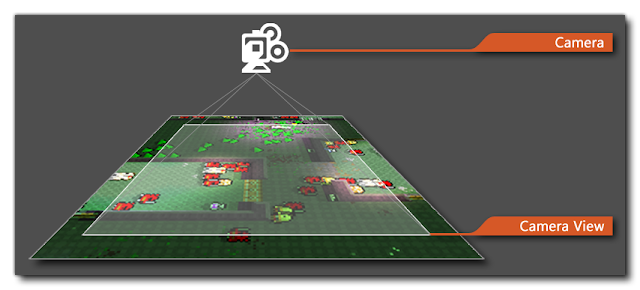
 This week I covered tutorial number 4 swell as number 5. Tutorial number 4 was about creating sprite animations of a robot within the game this tutorial was pretty challenging there was a lot of new things that we haven't been over before. we started off by using the animator component in unity and set up a new player controller within the animator component. Then when animating the robot all the frames had been given to us in our assets folder so we put those together in the animator this was the easy part the tutorial then got difficult when using the blend tree and setting the parameters but we got there in the end. the next tutorial was about creating a projectile. This was pretty straight forward all the code was given to us in the tutorial we made the projectile out of a cog sprite and then applied the appropiate physics to that it would collide with objects and fix the robot when collided with. Tutorial number 5 was about setting up the camera. We installed a package called...

Analysis

Image
 Finding papers for this week was pretty difficult I had initially been using the college library website but I then switched to using google scholar which I found a lot more effective I was able to find papers a-lot faster. I find that in a lot of papers that I look at on my topic there’s a fair bit of repetition. So I decided to mind map my topic and expand it a bit so I would have more success in diversifying my writings.  So this week I read a paper that looked at games as a meaningful experience. They conducted a test on two groups of people to examine the perceptions of enjoyable and meaningful video games. another hot topic that I decided to look into was the emotional and psychological aspect of first person shooter games and the reactions to the violence. Another paper I read read was about the physical interactions the player has with a machine. The vibrations of the controller the reactions caused from pressing the buttons to the sound effects linked with these thin...

Tutorial 2

Image
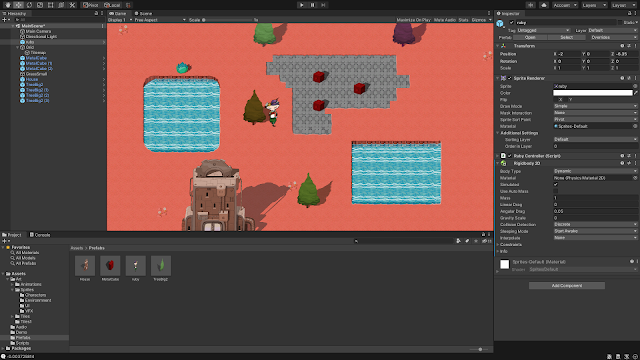
This weeks unity tutorials we about creating the world that our game is going to be played in. I didn't complete the tile steps correctly last week I saw this was a necessary part of the game so went back and finished them off before I started the new tutorials.  The first tutorial was really just about pacing the world together creating a map for the player to play on. putting boxes on and things like trees and houses on the map. Below is an image of how my game setting is looking. We changed the sprite sort point to pivot so that the player looked a bit more realistic when passing through objects.  The second tutorial was about giving the game physics. We did this so our player wouldn't be able to walk through solid objects. this was done by adding rigid body's and box colliders Over all this weeks unity tutorial wasn’t that hard. It took me a bit longer than the designated time but that’s my own fault really. Its cool to see the game come along nicely.

Reading 03

Image
This week we had to make 4 annotated bibliography’s. This seemed like a daunting task when first looking at it but it actually wasn't even that bad it was just time consuming. My topic was stories in games and why they're important. I just took it one paper at a time. The research I came across was actually very interesting. The first paper was all about how stories evoke emotions and how game designers measure the emotions when testing the game and this can predict whether or not the games going to be successful.     The second paper was about how games are set up so that the player becomes invested in the game the techniques used by game designers to encourage the player to become emotionally invested in the game. How they make the player feel become more attached to the character making them feel like they have control like they’re actually in the game.    The third piece of writing I chose was an article on the importance of stories in human behaviour. How they’v...

Tutorial 01

Image
 This week we undertook our first set of unity tutorials. We started on a 2d game that we will be making over the course of the next few weeks. The first tutorial was just about setting up the 2d editor. it was a little bit confusing but a lot of the layout is pretty similar to when we were making 3d games back in semester 1. once we did that we began making the main character for our game. I'm not entirely sure what happened I just followed the tutorial the best I could but I think we turned a png image into what's called a sprite. I think sprites are basically game objects. After we converted out character into a sprite we placed him/her in the game and went about coding the character so that when the arrow keys were pressed the character would move up down left and right. finally we started on tiles. This was the most confusing part to me. I kinda understood what was happening by Turing them into sprites too and slicing them into grids but I found the painting part quite con...

Planning

Image
 This week we chose the topic that we will begin research on. I chose to do mine on stories in games and more specifically why its important to put stories in games. Below is a picture of a mind map that I created and will use to help with my research. Secondly we had a talk from the librarian she showed us how to find books from the library and also how to use refworks  which is a programme for making life easier when it comes to refrencing. shorturl.at/abhDT

Game Testing

Image
 Game testing is a crucial part of game testing when creating a game its important to start testing as early as possible. there are a few risks when it comes to game testing. having a game with a non compelling experience. if its missing the fun factor or if its non player friendly if it is not a unique fast or competitive game  the purpose of game testing is to detect bugs and retain documentation of software products. There are 7 popular game testing methods 1. Fuctionality testing - Regards the overall testing of the functions within the game basically just making sure that all the game functions e.g. motion, audio, freezing, crashing etc..are running smoothly  2. Combonational - Determines how much further testing needs to be done on the game it improves the overall effectiveness of the testing experience. 3. Ad HOC Testing - this is more general testing it involves less structure and can be done at any point of development. It is completed by error guessing which is ...

Unity Tutorial 09

Image
Funnily enough this weeks set of unity tutorials I found to be the most enjoyable yet. Well maybe not enjoyable but relatively straight forward. For this first time all year I managed to follow along all the way through the tutorial without there being many complications.    This week we created a Fruit Ninja type game where random boxes or object’s would spawn up into the game view the objective of the player was to click and destroy the boxes to get points there were also bad items thrown into the mix as well in the case of my game was in the form of a bomb if the bomb was destroyed by accident it would result in the player loosing points the game is over when the player misses an object they were supposed to hit.    The first tutorial started off by creating a prototype and sorting out our assets same as any project then once they were imported we started on the code that allowed them to randomly spawn and be tossed into the air. This was probably the hardest part...

Game Stories

Image
Story telling in video games is a young art form that is increasingly rising. Successful story’s in games are designed by looking at what has worked in other story’s and making yours unique to other stories. Games aren’t movies and movies aren’t plays. To create a story in a game we have to first look at what attributes to a story that works with all platforms from movies to novels to plays etc. what is common between them all.   Conflict is storys. Story is conflict.   We can use a base structure when coming up with our game We start of with our hero or main character There is then an “inciting Incident” something that happens that strikes conflict. There is then an opportunity for our hero to push back against his conflict when he first tries and fails there are repercussions.  The hero now takes on a risk to overcome the obstacles that have resulted in this conflict this process is repeated twice with an even bigger risk the second time round and an even bigger risk th...

Alpha

Image
 This week we continued the making of my game further. Continuing on from last week I was having an issue with my player whenever I tried to add a rigid body component it would fall through the terrain I fixed this by adding in a mesh collider. This week I spent my time getting the controls down on my game now whenever the game starts the board takes off and can now be navigated using the left and right arrow keys. I learnt how to do this from following previous unity tutorials.  with the player now able to navigate the course I added an if statement to the player controller script that enables the player to jump so now when the home button is pressed the player can jump in the air. I had to adjust the mass of the player in the rigid body because whenever I would jump the player would be suspended in the air for too long this would have caused problems later in the game because some obstacles in the game are meant to be cleared others are not.  So far I think I'm on track...

Review week Comments and Feedback

Image
Comments and Feedback  Feedback In:   I think the whole general idea of giving weekly feedback is a great idea. Its nice to see people leaving nice comments on your blogs it really puts you in a good mood. Under the current circumstances of covid 19 and lockdown were constantly surrounded by negativity in the news and media and just small simple comments can really brighten up someone day it might not seem like a big deal to the person leaving the comment but a little kindness can go a long way.    Apart for the uplift in moral that the  comments bring they often incorporate valuable feedback with people offering suggestions. I like to ask questions in my blog asking for advice or opinions and I almost always get a response. I also write about my struggles in the blog posts and it is always reassuring when people comment that they are also in the same boat it builds a sense of community.   Feedback out:   Whenever I’m leaving feedback for other pe...

Week 9 Reading and Writing

Image
Reflection This weeks reading task was to look back over all our previous reading a writing assignment’s. Ill start off by saying this. I haven’t found the readings enjoyable just because its not an area I’m passionate about but I have found them bearable and useful. They’re not overly complicated so if you put the time in there’s no reason for me to complain.   I Personally haven’t had too many issues with the tasks. It definitely helps that there are 3 different articles covering the same topics. I found this helpful because the academic papers I find a very hard to digest. If all we had were the academic papers I would probably have no clue what were supposed to be learning over the semester. With that being said every week I go to attempt the academic paper they’re slowly becoming easier to digest.       I think the reading tasks definitely helped me when it comes to creating our games. Throughout the semester all the information we need to create a suc...

First Playable

Image
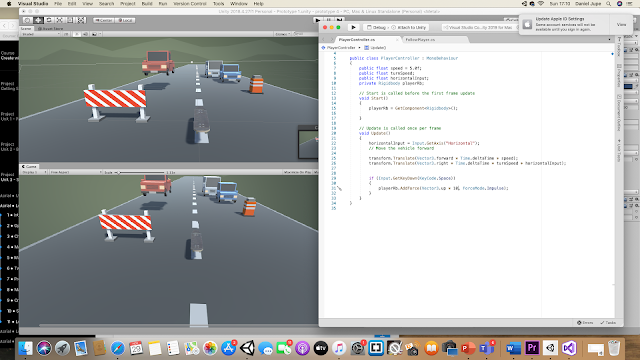
 This week we started on our coding. last week we were just gathering all our assets together and creating our scene. We started off by positioning the camera behind the skateboard to give us the in game view that we wanted this was pretty straight forward. Then we started on the coding for the player.  The coding for the player in my game is pretty much the same for the coding of the car in our first unity tutorial. I went back and watched the videos on how he nodded his game and applied what was nescesary to my game. All that needed changing was the speed and the turning. I thing added rigid bodies the obstacles for a start. I event gotten them to move yet but that won't be too hard. I took it pretty easy this week because of the submissions I had in other modules but next week I think I'll probably struggle with repeating the road constantly so that the driver doesnt fall off the edge.  Thats the only thing I'm a bit uncertain about. The rest of it should be straight f...

Unity Tutorial 07

Image
shorturl.at/ilyGP This weeks unity tutorial was interesting. In the first tutorial we went about creating a sphere (player) than adding a texture to it. We then coded it so that the sphere could roll forwards and backwards when the up and down arrow keys were being pressed. The we created a fixed focal point in the game and made the camera a child component of this empty game object then we added some code so that the camera would rotate around this fixed point when the left and right arrow keys were being pressed. Lastly in this tutorial we coded the sphere to roll up and down to whichever way the camera was facing this gives the players a way to navigate the platform.   In the second tutorial we created an enemy sphere we then used a vector I think to have the enemy sphere track locate and try push the player off the platform. This was the quickest tutorial. We created a spawn manager then turned the enemy into a prefab so that we could have the enemy sphere spawn at random point...

Game Fun

Image
Reading Week 8 “Game Fun" Games can be described by the 3 components Mechanics, Dynamics, and Aesthetics (MDA) or otherwise stated as rules – system – “fun” . The three reading selections this week and the synopsis below all address the term “fun” in relation to game design. There are eight types of Fun outlined by the MDA. These eight are both a source of reference and player experience that blend together in many ways, and essentially what makes a game engaging and enjoyable. Figure 1: Eight kinds of Fun Both Oxford and Merrian dictionaries define Fun as an enjoyment, delight but within the context of a game it refers to a form of pleasurable entertainment. MDA papers define the '8 kinds of fun' sensation, fantasy, narrative, challenge, fellowship, discovery, expression, and submission, remain a source of reference and possibly the most popular list of player interactions combining in various forms to attract each player to a particular game. Nicole Lazzaro presents fou...

Game Prototype

Image
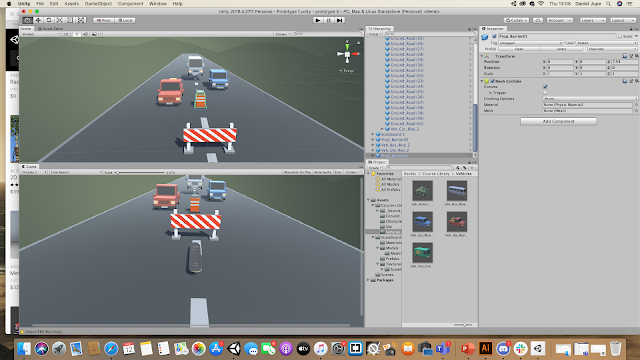
 This week we began by making our prototypes for our games. I was fortunate enough to already have most of the assets for my game already downloaded from the unity story. most fo the assets used will be from the first set of unity tutorials all I needed to outsource was a skateboard and a backdrop of some kind here are some screenshots of what I have put together so far The only one Im struggling to find is a sutible backdrop so if anyone who's reading this knows anything about designing backdrops in unity or where to source them from please drop a comment below all help is appreciated     once I have gotten my backdrop I will then begin my coding process.

Game Decisions

Image
Video “In order for the player to be optimally engaged, challenges should be presented at a level equivalent or slightly higher than their current skill. Not too easy, not too hard”( Gigity McD ) The word 'flow state' was coined by Csikszentmihalyi (1975) also known as being “in the zone” This is when the player is fully engaged in the game experience. Csikszentmihalyi put a lot of work into observing and analyzing various groups of people. This theory is focused on the idea of how people should balance their skills and the demands of particular tasks. An example of Flow would be a challenge in a game that interests the player such as a puzzle or a boss battle meant to keep the player interested and not get bored. Csikszentmihalyi also states that flow is related to an ideal psychological condition when a person engages in a challenge-skill activity, often resulting in concentration and a focused emphasis on a task. A practical technique for improving Flow is to look at what p...